

Today’s topic is PIP command not found. PIP is a Python dependency & library package manager. It is usually installed alongside Python 3x and Python 2x. However, in rare cases, you may encounter a “pip command not found” error when installing a library or Python package. In this article, we will go over the causes of this error as well as simple solutions to fix it. The systems discussed here are applicable to both Linux operating system and Windows users.
What is PIP?
PIP is a package manager for Python packages. It helps users install and manage various packages and frameworks in Python. Pip is installed with Python from Python version 3.4 and above. Pip is similar to Linux operating system package managers like apt-get, yum, etc.
How to solve”bash: pip command not found” error? [Method]
Solution 1: Install Python
As we mentioned, since Python 3.4, we know how to install pip with Python. Therefore, we can try to install Python on the machine to get rid of this error.
Step 1: Visit the official webpage to install Python on your machine. There, you will see different Python versions available for download. Choose an appropriate package and download the executable installer.

Step 2: When the executable file is downloaded, go to the download folder and open the file, double-click on the file to start the process, and hit “Install”. Now” to start the installation process.
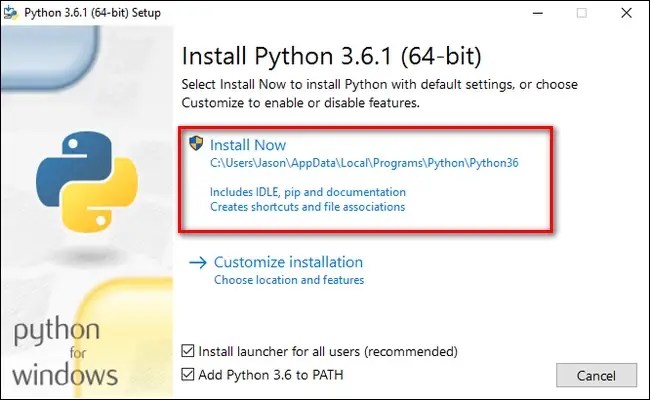
Once Python is installed, you will see the following window in the installer.

Step 3: To verify the pip installation, enter the pip -v command at the command prompt to view the pip version.
Step 4: To install Python on a Debian-based Linux distribution, download Python from the same official website and enter the following command in the terminal:
$ sudo apt-get install python3.8
Once Python is installed, you can verify the Python installation using the command below.
python –version
Solution 2: Use easy_install
If you’re using Python 2, you’ll need to install pip separately. Run the following command on Linux to get pip for Python 2x version.
$ sudo easy_install pip
Solution 3: Use pip3 instead of pip
You can also specify the version of pip as normal pip commands may not work with Python 3x in some cases. For this, use pip3 instead of pip when installing a package.
Conclusion
We have seen the solutions on how to fix the “pip command not found” error in this article. We have discovered that there are several possible causes for this issue, That can be solved by installing Python from scratch, installing a different version of pip, or specifying the pip version when installing packages. Learn CD command in windows here. You can Buy RDP from here.


