

Need NGINX on your cPanel/WHM server and confused about how to install and configure it? Don’t worry, we’re here to help. Installing NGINX on cPanel/WHM server is very easy and fast. We’ll be using Engintron to install NGINX on your cPanel/WHM server. There are some basic requirements to follow this guide which are discussed below.
Requirements To Install NGINX on your cPanel/WHM server
- cPanel/WHM installed Server
- Root Access to Server via SSH
Installation
-Login to root user via SSH
-To install Engintron run the following commands which will install NGINX
cd /; rm -f engintron.sh; wget –no-check-certificate https://raw.githubusercontent.com/engintron/engintron/master/engintron.sh; bash engintron.sh install
-Above installation will take a few minutes depending on the machine specification.
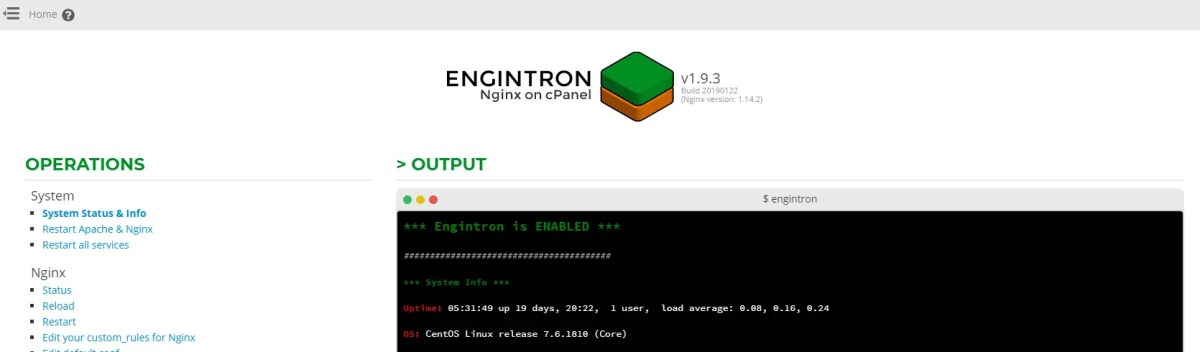
-Log in to WHM and Goto Plugins, and you will get “Engintron for cPanel/WHM”, which means your Engintron is successful with NGINX.

This is what Engintron’s page looks like after opening it.
Configuration for Cloudflare users
- Open EngineTron as explained in the last step of the installation
- Look for “Edit your custom_rules for Nginx (see defaults)” under the NGINX menu in the left sidebar and tap it
- Comment out the following line by removing the # character
set $PROXY_DOMAIN_OR_IP “XXX.XXX.XXX.XXX”;
XXX.XXX.XXX.XXX – This is your cPanel shared IP address, replace it and tap on Update Rules.

Enginetron will restart and everything will work out of the box.
So we have completed NGINX installation with Enginetron.
Some informative stuff for enginetron Nginx in cPanel
Some informative stuff for enginetron Nginx in cPanel
- Engintron will improve your server performance and web serving capacity while reducing CPU/RAM load at the same time.
- The Nginx web server acts as a reverse caching proxy for static files (eg CSS, JS, images, etc.) with an additional micro-cache layer to significantly improve performance for dynamic content generated by CMSs like WordPress, etc. Apache web server is running with Nginx.
- The same Apache htaccess rules work with Engintron and require no additional changes or configuration.
- Engintron/Nginx is installed globally on the server for all cPanel users and requires no additional configuration on the server.
- Enginetron works with Cloudflare without any issues. Follow the Configuration for Cloudflare section for its setup.
Learn how to install cPanel and WHM on a CentOS VPS or Dedicated Server.


